
Why do we need a reporting system
 At one time, when the accounting system required to make the system for displaying information on print went through a lot of different systems of reporting – some as FastReport, were a part of the editors, and remarkably shaped plates, but most users like, when you can quickly and beautifully to receive information ihnem favorite Excel, without the need for converters, etc.
The Internet has long been a sea of information on the interaction of Delphi and Microsoft Excel, and I’m not going to write another guide. Instead, I propose to see how it can develop a pretty simple system report output to Excel, and sufficient to address if not all, but most of the problems.
When each report is fully formed in Delphi code drawback of this method was that of Delphi’s code could not see the logic of the report creation process, and most importantly – to change every detail in the design had to modify the code and recompile the project. Then the idea to write a small report generator, the report template – this is the usual ekselevsky file in which anyone will be able to correct what he needs, and to determine in advance the format of print.
The structure of report generator for Excel
The basis of template up “bands”. Bend is one or more lines, arranged in a row and with one and the same label – the name of the band. It is put in the first column of each row. That’s about will look like ready-made template of the report:
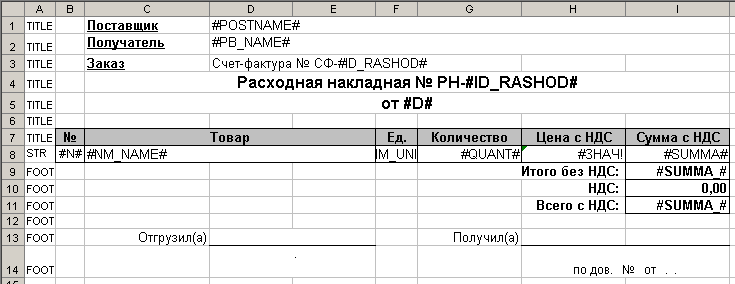
Our component will be able to open the template, insert the specified band, insert the value of variables at the last inserted Bend to show progress in a number of derived lines (for simplicity we will not tinker with the miscalculation of the total), as well as proper to open the result itself.
The class of the report will be very simple:
 TA7xReport = class(TComponent)
  private
    Excel, TemplateSheet: Variant;
    Progress: TWcProgress;
    CurrentLine: integer; // текущая строка построения отчета
    FirstBandLine, LastBandLine: integer; // положение последнего добавленного бэнда
  protected
  public
    procedure OpenTemplate(FileName: string);
    procedure PasteBand(BandName: string);
    procedure SetValue(VarName: string; Value: Variant);
    procedure Show;
    destructor Destroy; override;
  published
  end;
Begin construction of any report would be calling the procedure OpenTemplate, which will launch Excel, open it in the desired pattern, and initiate necessary further variables:
  Excel := CreateOleObject('Excel.Application');
  Excel.Workbooks.Open(FileName, True, True);
  TemplateSheet := Excel.Workbooks[1].Sheets[1];
  Excel.DisplayAlerts := False; // Чтобы подавить сообщение об ошибке при замене ненайденного значения в операции SetValue
  CurrentLine := 1;
  Progress := TA7xProgress.Create(Self);
  Application.ProcessMessages;
There is mentioned object TA7xProgress, which is a simple form with a couple of labels to display to the user the progress of construction of the report that he did not think that the program hangs.
After the template is open, report building code will call the method PasteBand whenever you need to add to the original blank sheet of another piece of the report template.
The technology involves the addition of bands that we put bands just before the template, thereby leaving a pattern always at the end of the document. To do this, we find the right name for our band, starting to look for us after the last inserted band and beyond, and also define the length and the band found. Ie the following piece of code in variables FirstBandLine and retain LastBandLine beginning and end of the band:
  FirstBandLine := 0; LastBandLine := 0;
  i := CurrentLine;
  while ((LastBandLine = 0) and (i < CurrentLine + MaxBandLines)) do begin
    v := Variant(TemplateSheet.Cells[i, 1].Value);
    if (varType(v) = varOleStr) and (FirstBandLine = 0) then begin
      if v = BandName then begin // нашли начало бенда
        FirstBandLine := i;
      end;
    end;
    if (FirstBandLine <> 0) then begin
      if not ((varType(v) = varOleStr) and (v = BandName)) then LastBandLine := i - 1;
    end;
    inc(i);
  end;
Further, this pattern is found kopipastim inserted immediately after the last contact Band, if it already has been:
  Range := TemplateSheet.Rows[IntToStr(FirstBandLine) + ':' + IntToStr(LastBandLine)];
  Range.Copy;
  Range := TemplateSheet.Rows[IntToStr(CurrentLine) + ':' + IntToStr(CurrentLine)];
  Range.Insert;
Well, change the variables indicating the position of the last line of the report and what is now copied our band. The latter is necessary to know the range in which to look for the desired period of our variable name to replace its values:
  CurrentLine := CurrentLine + (LastBandLine - FirstBandLine) + 1;
  // вычисляем позицию куда был скопирован бэнд
  FirstBandLine := CurrentLine - (LastBandLine - FirstBandLine) - 1;
  LastBandLine := CurrentLine - 1;
The next method to be used to display values on a piece of template already copied – SetValue. The code for this method is very simple, as is searching for a replacement, the values in the given range by means of Excel:
  Range := TemplateSheet.Rows[IntToStr(FirstBandLine) + ':' + IntToStr(LastBandLine)];
  Range.Replace(VarName, s);
SetValue method must be called as many times as we are on the right values, we band. Finally after all the bands will be withdrawn, the latter method is called – Show, which finally removed the template, which displaces the end of the document and Excel Trnsfer from the invisible into the visible state.
It is worth mentioning that if we say to interrupt the debug report to call Excel.Visible: = true; then Excel will remain hanging in the memory of the invisible, and for the next report will create a new instance of Excel.
What is the use of the reporting tool in Delphi-code
Now the most interesting – an example of this report generator:
Here is full procedure which is shown above using the template output in Excel format given consignment:
procedure TdrashodForm.Print(Template: string);
var i: integer;
  summa_: double;
  h : string;
begin
  Rep.OpenTemplate(Template);
  Rep.PasteBand('TITLE');
  Rep.SetValue('#ID_RASHOD#', ID_RASHOD);
  Rep.SetValue('#PB_NAME#', PbFrame.PbEdit.Text);
  Rep.SetValue('#D#', DateToStr(NaklDTP.Date));
  Rep.SetValue('#POSTNAME#', PostEdit.Text);
  i := 1; summa_ := 0;
  NaklQuery.First;
  while not NaklQuery.Eof do begin
      Rep.PasteBand('STR');
      Rep.SetValue('#N#', i);
      h := NaklQuery['KH_NAME'];
      if h<>'' then h := '['+h+']';
      Rep.SetValue('#NM_NAME#', NaklQuery['NM_NAME']+' '+h);
      Rep.SetValue('#QUANT#', NaklQuery['RSD_QUANT']);
      Rep.SetValue('#SUMMA#', coalesce(NaklQuery['RSD_OSUMMA'],0));
      Rep.SetValue('#NM_UNIT#', coalesce(NaklQuery['NM_UNIT'],''));
      Rep.SetValue('#ZK_NUMBER#', coalesce(NaklQuery['ZK_NUMBER'],''));
      Rep.SetValue('#TW_NAME#', coalesce(NaklQuery['TW_NAME'],''));
      summa_ := summa_ + coalesce(NaklQuery['RSD_OSUMMA'],0);
      inc(i);
    NaklQuery.Next;
  end;
  Rep.PasteBand('FOOT');
  Rep.SetValue('#SUMMA_#', summa_);
  Rep.Show;
end;
As you can see, the logic of the formation of the printing plate is completely transparent and is not burdened with the technical code output values in the desired cell Microsoft Excel – all this takes care our component of the report, and in addition, unlike many of reporting, we have all the power of Delphi to calculate and obtain we need values in different parts of the procedure for constructing the report.
And now the most important thing …
Where can I get this wonderful system and even free
Home project is on a7in.com
Вопрос снимается, в procedure TA7Rep.PasteBand(BandName: string);
вот эти строки были закомменктированны
{ // delete band name from result lines
for i := CurrentLine to CurrentLine + (LastBandLine – FirstBandLine) do begin
TemplateSheet.Cells[i, 1].Value := ”;
end;
}
Эти комментарии, были убраны и все заработало
Добрый День!
В Excel 2016 не удаляются Наименование бандов, как сделать, чтобы они удалялись?
Можно ли с помощью Вашего компонента передать в ексель цвет ячейки?
Можно! Если добавить туда процедуру установки цвета ячейки:
procedure TA7Rep.SetColor(VarName: string; Color: Variant);
var
  x, y : Integer;
begin
  ExcelFind(VarName, x, y, xlValues);
  if Color=null then begin
    TemplateSheet.Cells[y, x].Interior.Pattern := -4142; //xlNone;
  end else begin
    TemplateSheet.Cells[y, x].Interior.Pattern := 1; //xlSolid;
    TemplateSheet.Cells[y, x].Interior.PatternColorIndex := -4105; // xlAutomatic;
    TemplateSheet.Cells[y, x].Interior.Color := Color;
  end;
end;
Цвет 255 это красный. Все это можно подсмотреть если перейти в режим записи макроса в Excel и выполнив интересующие вас действия посмотреть на код.
I have noticed you don’t monetize your page, don’t waste your traffic, you can earn extra bucks
every month because you’ve got hi quality content.
If you want to know how to make extra bucks, search for: Ercannou’s essential adsense alternative
Немного дописал исходный код:
Процедура смены активного листа (иногда нужно начать заполнение не с первого листа, а потом вернуться к первому).
procedure TA7Rep.ActivateWorkSheet(Name: string);
begin
  if Name='' then
    TemplateSheet := Excel.Workbooks[1].Sheets[1]
  else
    TemplateSheet := Excel.Workbooks[1].Sheets[Name];

  CurrentLine := 1;
  MaxBandColumns := TemplateSheet.UsedRange.Columns.Count;

  if Assigned(Progress) then
    Progress.L3.Caption := 'Sheet: ' + Name;
end;
Процедура для переноса таблицы в любую часть отчета, например, справа от других таблиц. Таблица с фиксированными размерами, строки в нее не вставляются. Таблица шаблона выделяется в именованный диапазон, например totals, а в начальной ячейке, куда вставлять таблицу, пишется идентификатор, например, :totals_to. Эту таблицу в шаблоне не помечаем именами бэндов.
Перед переносом таблицы необходимо заполнить ее значения с помощью этой процедуры (бэндов-то нет).
procedure TA7Rep.SetValueNamed(VarName: string; Value: Variant); var Range: Variant; begin Range := TemplateSheet.Cells.Find(VarName); if Value = null then Range.Replace(VarName, '') else Range.Replace(VarName, VarToStr(Value)); end;Не могу найти Ваш компонент на сайте, по сслыке на скачку – not found
Извиняюсь за битую ссылку. Перезалил более свежую версию.
можно ли вставить рисунок с помощью этого компонента?
a7: К сожалению нет. Но есть возможность вставлять строки с рисунком, если они в таком виде будут в шаблоне. Можно даже заготовить несколько альтернативных бендов, если нужны несколько заранее известных вариантов рисунка, но вставлять произвольный рисунок на этапе генерации отчета все-же нельзя.
Идея очень хорошая, что-то похожее в 1С.
Вот бы хотя бы идею расшифровки данных в ячеке.
Когда данные уже отданы в эксель то уже наврядли это получиться…
a7: Я думаю что теоретически это все-же возможно, например вмонтировав в Excel код VBScript, но это действительно очень нетривиальный и тернистый путь – я таким заниматься пожалуй пока не буду 🙂
Как я понял для Delphi RAD XE он не подойдет ?
a7:Этот отчетный компонент не содержит ничего сложного в себе и его можно без проблем скомпилировать под нужную версию Delphi. Но я все же уже добавил сборку и под Delphi XE2
Отличная вещь!!!!!!!!!!!!!!!!
Вопрос – как добиться того, что бы если наименование товара длинное, то строка изменяла высоту под размер товара, но не для каждого товара одна высота!!!!!
Тоесть один товар – длинный – высоту строки изменили в зависимости от длины второй товар не длинный высоту не меняем т д
Огромное спасибо!!! а компонент то что надо!!!!!!!!!!!!!!
a7:Легко! Поскольку шаблон отчета это обычный эксель то нужно в ячейке шаблона просто установить параметр “переносить по словам” ну и все остальные если надо параметры крутить. Все точно также как делается в экселе при обычной работе. Сам генератор отчета в доработках не нуждается